
Get help using the Maia app
Browse step-by-step how-tos and feature tips below, or reach out directly if you can't find what you're looking for.
Contact Support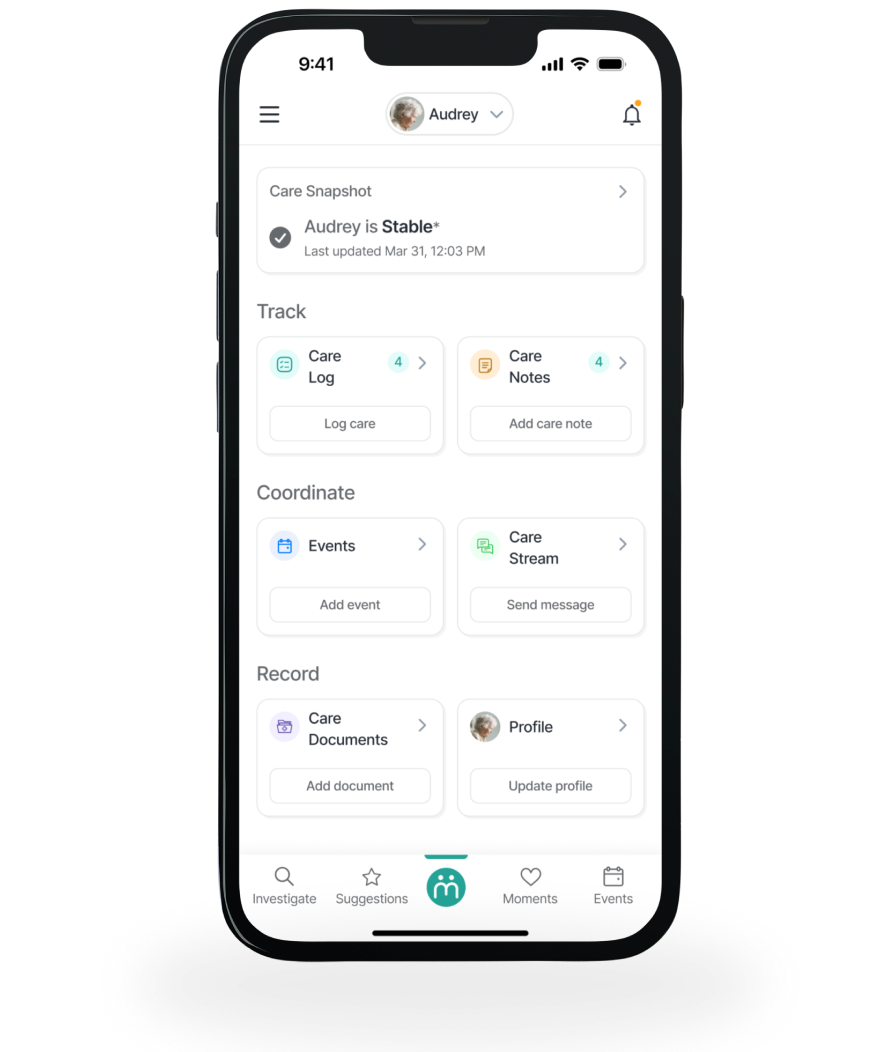
Step-by-step guides by topic
The live app pairs each of these with a short how-to video; reproduced here as text topics only.
Getting Started
Download app, Notifications, Senior profile
- How to download and log on from Apple Store
- How to download and log on from Android Store
- How to manage notifications
- How to set up and update a Senior's profile
Managing Circles
Caregiver Circle
- How to change the primary caregiver
- How to create a new caregiver circle or link circles
- How to add someone to a caregiver circle
Tracking and Recording
Care Log, Care Notes, Care Document
- How to set up items to track
- How to log updates to tracked items
- How to add a care note and review existing care notes
- How to add a care document
- How to review existing care documents and share them
- How to use care snapshot
Coordinating
Events, Care Stream, Moments
- How to add events including appointments, tasks, and medications
- How to update events and share events
- How to send a message to the care stream
- How to add and share moments
Exploring
Investigate, Library, Suggestions, Local services
- How to investigate concerns and review or share articles from the library
- How to review and share suggestions
- How to find local services
Feedback
- How to report an issue or provide feedback to Maia Care
What everything in the app does
Navigation bar
Use the navigation bar to jump to key screens at any time. The Maia icon brings you to the Home screen. Holding the Maia icon down activates these Tips.
Care Snapshot
Ask Maia to summarize care issues and notes for any period of time. The Snapshot is generated dynamically and can take a few seconds -- you'll be notified when it's ready.
Care Log
Track health indicators like activities, eating, hydration, and mood, plus personal care items, symptoms, and vital signs. Any caregiver in a Circle can log an entry; others see it in real time.
Care Notes
Record care events as text or audio notes, and include an image or video.
Events
Use the shared calendar to coordinate and manage appointments, tasks, and medication reminders.
Care Stream
A private, secure group text thread for a Care Circle. Maia can analyze the messages to flag issues worth including in a Care Snapshot.
Care Documents
Store critical documents and images and share them as appropriate.
Profile
Maia maintains a profile of your older adult and their caregiver circle, reviewable by Maia and updatable by any Circle member.
Moments
Capture memories as pictures or videos, and comment on and share Moments with other caregivers in a stream.
Senior name
The active profile and Care Circle is shown by the older adult's name. Use the arrow to manage a profile, switch profiles, or link circles to share Moments, Events, and Care Documents.
Notification icon
Lights up when there's a special alert for you -- tap it to see all active notifications.
Hamburger menu
Manage your account, set up notifications, find help, rate the app, and sign out.